


1.はじめに
Skills.sh とは様々な Agent Skills の発見・共有ができるプラットフォームで、Vercel が2026年1月21日に公開しました。
本ブログでは、Skills.sh のサイトの内容紹介から、実際に Skills.sh で見つけた Skill のインストール、その Skill の実行をしてみます。
使用する Skill は Terraform で AWS のインフラコードを生成するもので、これを Gemini CLI にインストールし、実際に動かしてみます。
2.Skills.shのサイトを見てみる
Skills.sh を見てみます。
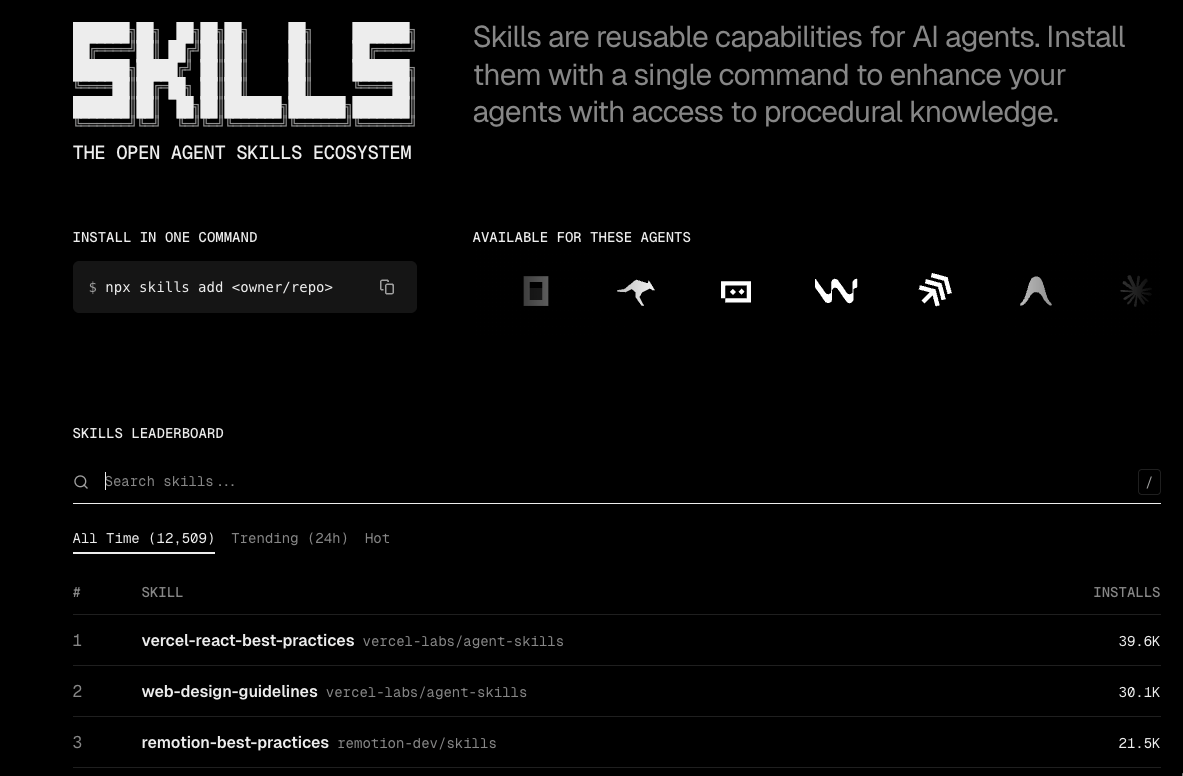
Skill のインストールコマンド例、利用可能な AI エージェントのアイコン、そして Skill の一覧が表示されています。Skill はインストール数の多い順に表示されています。
Docs の Overview に Skill のランク付け方法の説明が記載されています。
Skills.sh に記載されているコマンドで Skill をインストールすると、匿名のテレメトリデータを収集するようで、その情報からランク付けをしているようです。
<日本語訳>スキルリーダーボードは、Skills CLIから収集された匿名のテレメトリデータに基づいてスキルをランク付けします。ユーザーがスキルをインストールすると、集計された使用状況データに基づいて、エコシステム内で最も人気があり、役立つスキルが明らかになります。このテレメトリは完全に匿名であり、どのスキルがインストールされているかを追跡するだけです。個人情報や使用パターンは収集されません。
CLI Reference では Skill のインストール例とテレメトリーに関する情報が記載されています。
テレメトリーの収集についてはオプトアウト可能なようです。
<日本語訳>デフォルトでは、CLIはリーダーボードでのスキルのランキング付けに役立つ匿名のテレメトリデータを収集します。このデータにはスキル名とタイムスタンプのみが含まれ、個人情報やデバイス情報は収集されません。オプトアウトするには、SKILLS_NO_TELEMETRY=1 の環境変数を設定します。
FAQ も用意されています。
Skill のインストール方法や独自 Skill の作成方法、テレメトリーはオプトアウト可能か等の情報が記載されています。
続いて、Skills.sh のサイトから具体的な Skill を一つ見てみます。
トップページに Skill の検索タブがあるので、terraform と入力します。

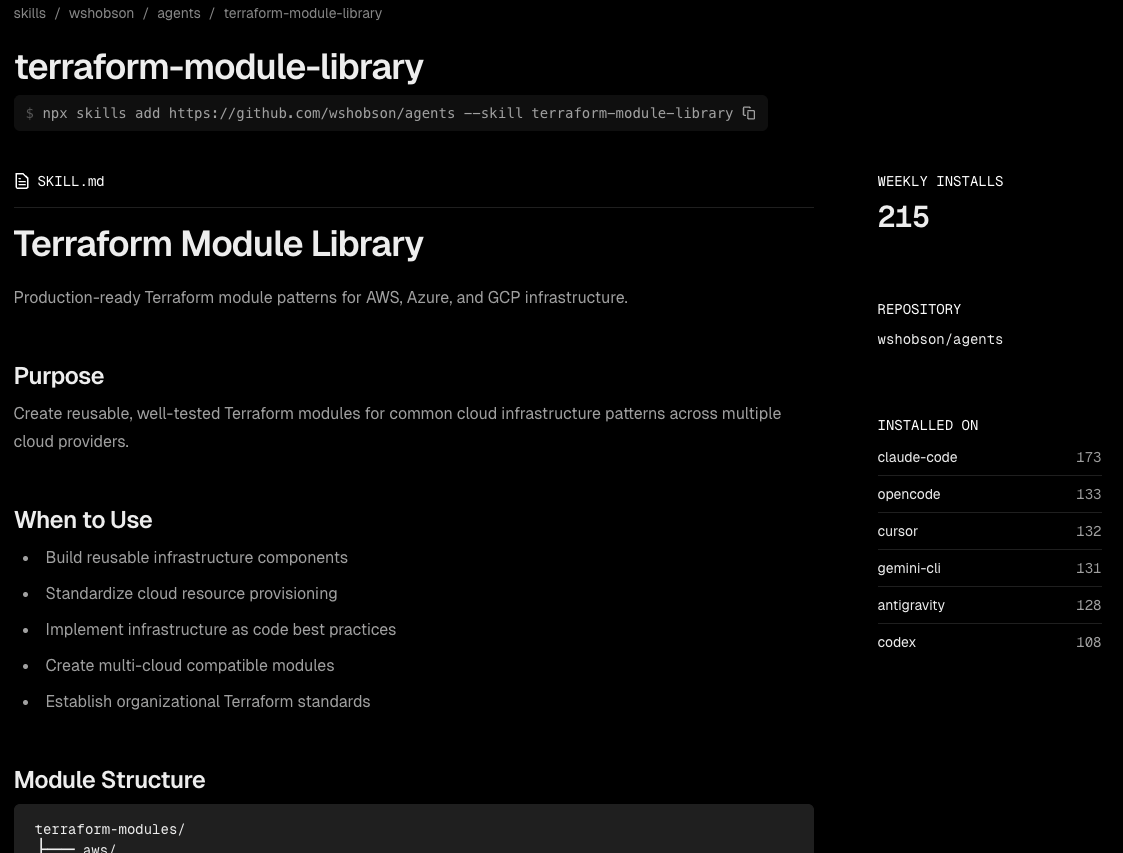
terraform-module-library という Skill がヒットしたのでこれをクリックしてみます。
terraform-module-library のインストールコマンド、この Skill の SKILL.md の内容、週間インストール数、リポジトリ情報、そしてどの AI エージェントツールにどれだけインストールされているかが表示されています。
ざっと Skills.sh のサイトを見てみました。
続いては、実際に AI エージェントツールに Skills.sh から terraform-module-library をインストールしてみます。
使用する AI エージェントツールは Gemini CLI です。
3.Terraform Module LibraryをSkills.shからインストール
作業を行う環境情報は以下です。
- macOS:Sequoia 15.7.3
- Node.js のバージョン(
node --version):24.11.1 - Gemini CLI のバージョン(
gemini --version):0.25.2 - 利用モデル:Gemini 3 を含んだ Auto モード
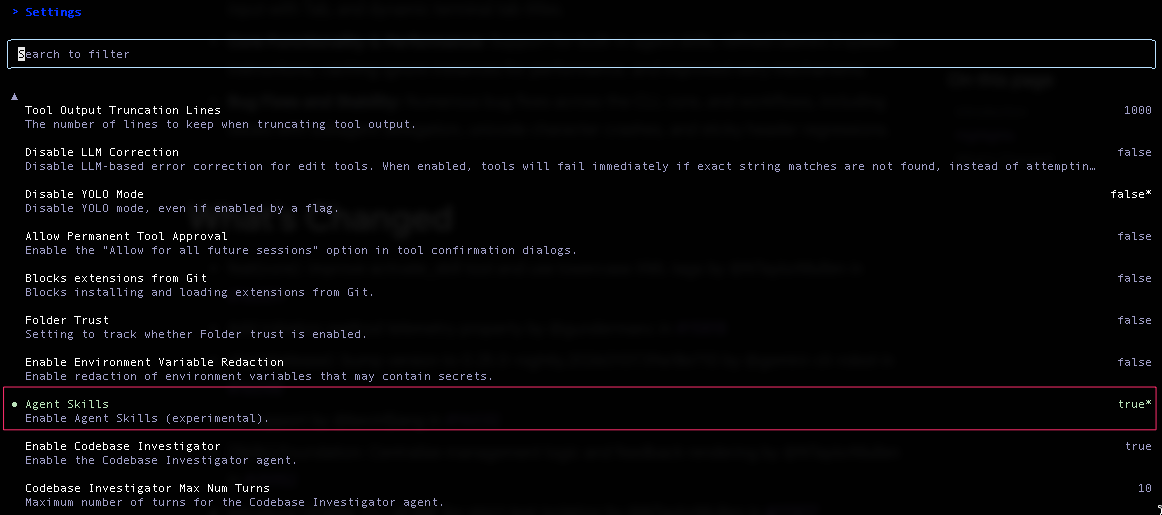
Gemini CLI を立ち上げ、Agent Skills を有効化します。
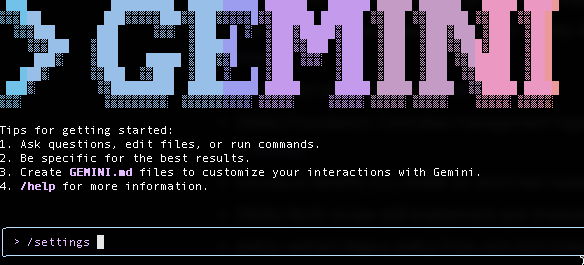
/settings コマンドを実行し、Agent Skills を選択、エンターボタンを押下し、false から true に変更、esc ボタンで settings から抜けます。
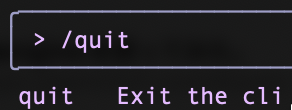
/quit コマンドで一度 Gemini CLI から抜けます。
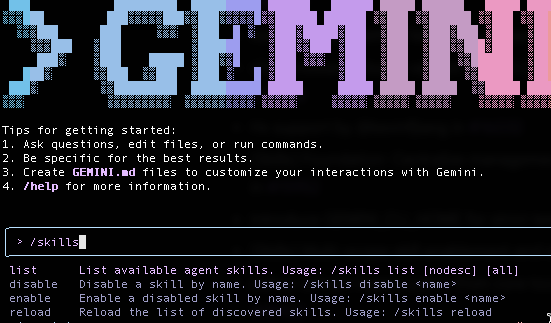
再度 Gemini CLI を立ち上げ、/skills コマンド を見てみます。
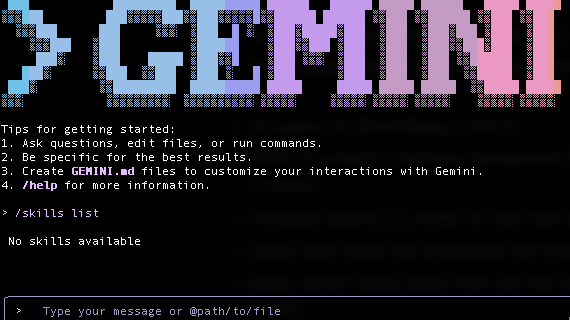
list コマンドを実行しましたが、今は Skill を何も設定していないので、No skills available と表示されています。
では、この状態から terraform-module-library を Skills.sh に記載されているコマンドを実行する形でインストールしてみます。
(Gemini CLI 上でインストールコマンドを実行していますが、Gemini CLI 上で実行が必要なわけではございません。npx コマンドが実行できる環境であれば問題ございません)
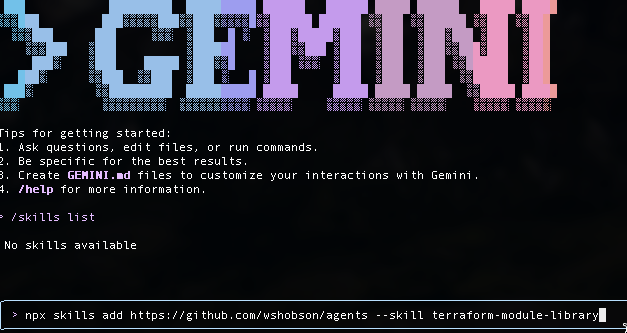
インストール用のコマンドはこちらです。
npx skills add https://github.com/wshobson/agents --skill terraform-module-library
コマンド実行後のインストールプロセスにて、インストールスコープを Global とするか問われるので Global とし、また、Symlink 推奨とのことなので Symlink で進め、インストールを実行しました。
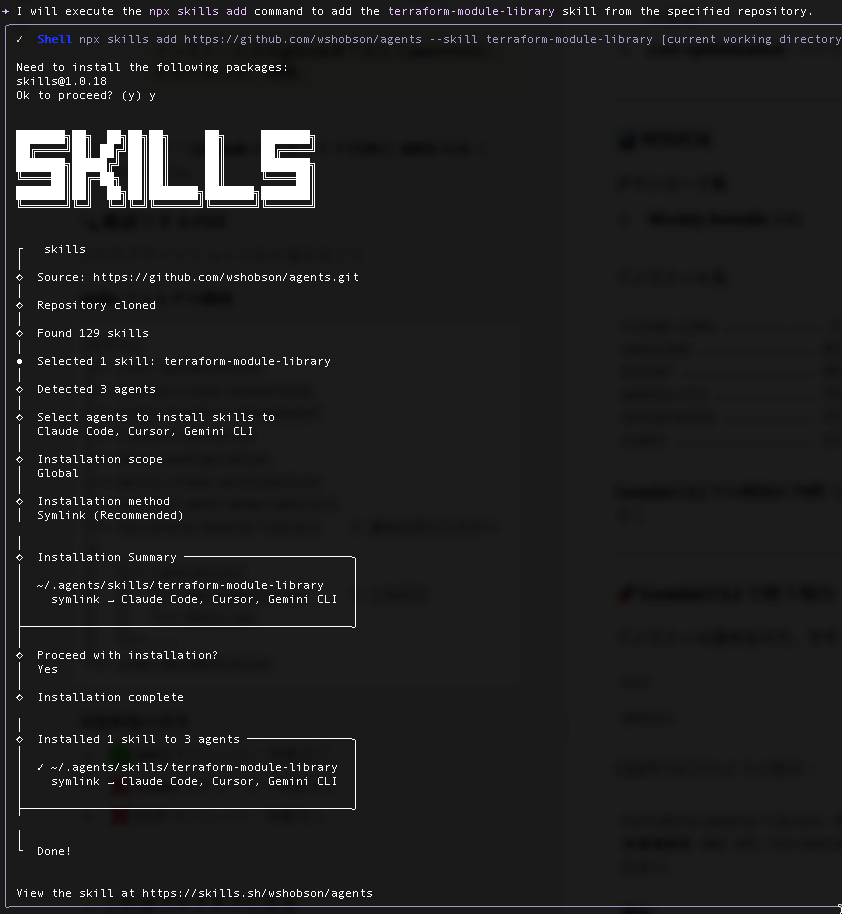
Done ! との事なので、Skill のインストールができているはずです。
/skills コマンドで確認してみます。
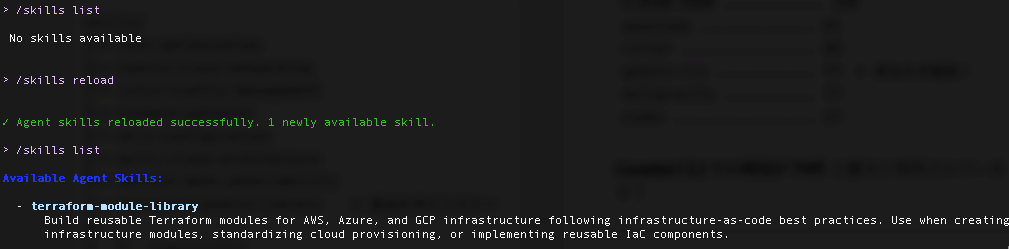
list コマンドを実行しましたが、No skills available だったので、reload コマンドを実行。
reload 成功とのことで、再度 list コマンドを実行したところ、terraform-module-library の Skill が表示されました。
> /skills list

 No skills available


> /skills reload


✓ Agent skills reloaded successfully. 1 newly available skill.

> /skills list

Available Agent Skills:

  - terraform-module-library
      Build reusable Terraform modules for AWS, Azure, and GCP infrastructure following infrastructure-as-code best practices. Use when creating
      infrastructure modules, standardizing cloud provisioning, or implementing reusable IaC components.
ここで一旦 Gemini CLI を閉じ、この Skill のインストールに伴い作成されたディレクトリを見てみます。
.agents の隠しフォルダとその中に skills フォルダ、 /terraform-module-library/references/aws-modules.md と /terraform-module-library/SKILL.md が作成されています。
/Users/名前/.agents/skills/terraform-module-library/
├── references/
│   └── aws-modules.md
└── SKILL.md
今回は Gemini CLI を使うので、.gemini フォルダを見てみると、以下の通り シンボリックリンク で Skill が設定されています。
$ ls -la ~/.gemini/skills/terraform-module-library
〜省略〜 /Users/名前/.gemini/skills/terraform-module-library -> ../../.agents/skills/terraform-module-library
terraform-module-library のインストールができたので、次はこの Skill を実際に動かしてみます。
4.Terraform Module Libraryを使ってみた
まず SKILL.md と aws-modules.md の内容を見てみます。
SKILL.md には、
- AWS / Azure / GCP 向けのProduction-ready な Terraform モジュール生成
- IaC のベストプラクティス適用
- モジュール構造 (main.tf / variables.tf / outputs.tf など)
- テストについて
が定義されています。
詳細は以下です。
※AWS / Azure / GCP 向けと記載されていますが、本ブログ執筆時点では AWS に寄った内容となっています。
SKILL.md
---
name: terraform-module-library
description: Build reusable Terraform modules for AWS, Azure, and GCP infrastructure following infrastructure-as-code best practices. Use when creating infrastructure modules, standardizing cloud provisioning, or implementing reusable IaC components.
---

# Terraform Module Library

Production-ready Terraform module patterns for AWS, Azure, and GCP infrastructure.

## Purpose

Create reusable, well-tested Terraform modules for common cloud infrastructure patterns across multiple cloud providers.

## When to Use

- Build reusable infrastructure components
- Standardize cloud resource provisioning
- Implement infrastructure as code best practices
- Create multi-cloud compatible modules
- Establish organizational Terraform standards

## Module Structure

terraform-modules/
├── aws/
│   ├── vpc/
│   ├── eks/
│   ├── rds/
│   └── s3/
├── azure/
│   ├── vnet/
│   ├── aks/
│   └── storage/
└── gcp/
    ├── vpc/
    ├── gke/
    └── cloud-sql/

## Standard Module Pattern

module-name/
├── main.tf          # Main resources
├── variables.tf     # Input variables
├── outputs.tf       # Output values
├── versions.tf      # Provider versions
├── README.md        # Documentation
├── examples/        # Usage examples
│   └── complete/
│       ├── main.tf
│       └── variables.tf
└── tests/           # Terratest files
    └── module_test.go

## AWS VPC Module Example

**main.tf:**

resource "aws_vpc" "main" {
  cidr_block           = var.cidr_block
  enable_dns_hostnames = var.enable_dns_hostnames
  enable_dns_support   = var.enable_dns_support

  tags = merge(
    {
      Name = var.name
    },
    var.tags
  )
}

resource "aws_subnet" "private" {
  count             = length(var.private_subnet_cidrs)
  vpc_id            = aws_vpc.main.id
  cidr_block        = var.private_subnet_cidrs[count.index]
  availability_zone = var.availability_zones[count.index]

  tags = merge(
    {
      Name = "${var.name}-private-${count.index + 1}"
      Tier = "private"
    },
    var.tags
  )
}

resource "aws_internet_gateway" "main" {
  count  = var.create_internet_gateway ? 1 : 0
  vpc_id = aws_vpc.main.id

  tags = merge(
    {
      Name = "${var.name}-igw"
    },
    var.tags
  )
}

**variables.tf:**

variable "name" {
  description = "Name of the VPC"
  type        = string
}

variable "cidr_block" {
  description = "CIDR block for VPC"
  type        = string
  validation {
    condition     = can(regex("^([0-9]{1,3}\\.){3}[0-9]{1,3}/[0-9]{1,2}$", var.cidr_block))
    error_message = "CIDR block must be valid IPv4 CIDR notation."
  }
}

variable "availability_zones" {
  description = "List of availability zones"
  type        = list(string)
}

variable "private_subnet_cidrs" {
  description = "CIDR blocks for private subnets"
  type        = list(string)
  default     = []
}

variable "enable_dns_hostnames" {
  description = "Enable DNS hostnames in VPC"
  type        = bool
  default     = true
}

variable "tags" {
  description = "Additional tags"
  type        = map(string)
  default     = {}
}

**outputs.tf:**

output "vpc_id" {
  description = "ID of the VPC"
  value       = aws_vpc.main.id
}

output "private_subnet_ids" {
  description = "IDs of private subnets"
  value       = aws_subnet.private[*].id
}

output "vpc_cidr_block" {
  description = "CIDR block of VPC"
  value       = aws_vpc.main.cidr_block
}

## Best Practices

1. **Use semantic versioning** for modules
2. **Document all variables** with descriptions
3. **Provide examples** in examples/ directory
4. **Use validation blocks** for input validation
5. **Output important attributes** for module composition
6. **Pin provider versions** in versions.tf
7. **Use locals** for computed values
8. **Implement conditional resources** with count/for_each
9. **Test modules** with Terratest
10. **Tag all resources** consistently

## Module Composition

module "vpc" {
  source = "../../modules/aws/vpc"

  name               = "production"
  cidr_block         = "10.0.0.0/16"
  availability_zones = ["us-west-2a", "us-west-2b", "us-west-2c"]

  private_subnet_cidrs = [
    "10.0.1.0/24",
    "10.0.2.0/24",
    "10.0.3.0/24"
  ]

  tags = {
    Environment = "production"
    ManagedBy   = "terraform"
  }
}

module "rds" {
  source = "../../modules/aws/rds"

  identifier     = "production-db"
  engine         = "postgres"
  engine_version = "15.3"
  instance_class = "db.t3.large"

  vpc_id     = module.vpc.vpc_id
  subnet_ids = module.vpc.private_subnet_ids

  tags = {
    Environment = "production"
  }
}

## Reference Files

- `assets/vpc-module/` - Complete VPC module example
- `assets/rds-module/` - RDS module example
- `references/aws-modules.md` - AWS module patterns
- `references/azure-modules.md` - Azure module patterns
- `references/gcp-modules.md` - GCP module patterns

## Testing

// tests/vpc_test.go
package test

import (
    "testing"
    "github.com/gruntwork-io/terratest/modules/terraform"
    "github.com/stretchr/testify/assert"
)

func TestVPCModule(t *testing.T) {
    terraformOptions := &terraform.Options{
        TerraformDir: "../examples/complete",
    }

    defer terraform.Destroy(t, terraformOptions)
    terraform.InitAndApply(t, terraformOptions)

    vpcID := terraform.Output(t, terraformOptions, "vpc_id")
    assert.NotEmpty(t, vpcID)
}

## Related Skills

- `multi-cloud-architecture` - For architectural decisions
- `cost-optimization` - For cost-effective designs
aws-modules.md の内容としては、モジュールテンプレートと AWS ベストプラクティスが定義されています。
詳細は以下です。
※本ブログ執筆時点では aws の md ファイルのみとなります。
aws-modules.md
# AWS Terraform Module Patterns

## VPC Module

- VPC with public/private subnets
- Internet Gateway and NAT Gateways
- Route tables and associations
- Network ACLs
- VPC Flow Logs

## EKS Module

- EKS cluster with managed node groups
- IRSA (IAM Roles for Service Accounts)
- Cluster autoscaler
- VPC CNI configuration
- Cluster logging

## RDS Module

- RDS instance or cluster
- Automated backups
- Read replicas
- Parameter groups
- Subnet groups
- Security groups

## S3 Module

- S3 bucket with versioning
- Encryption at rest
- Bucket policies
- Lifecycle rules
- Replication configuration

## ALB Module

- Application Load Balancer
- Target groups
- Listener rules
- SSL/TLS certificates
- Access logs

## Lambda Module

- Lambda function
- IAM execution role
- CloudWatch Logs
- Environment variables
- VPC configuration (optional)

## Security Group Module

- Reusable security group rules
- Ingress/egress rules
- Dynamic rule creation
- Rule descriptions

## Best Practices

1. Use AWS provider version ~> 5.0
2. Enable encryption by default
3. Use least-privilege IAM
4. Tag all resources consistently
5. Enable logging and monitoring
6. Use KMS for encryption
7. Implement backup strategies
8. Use PrivateLink when possible
9. Enable GuardDuty/SecurityHub
10. Follow AWS Well-Architected Framework
では、実際にこの Skill を使って、NW 部分のインフラコードを生成してみます。
プロンプトは以下です。
@infra_NW.md "skillを使ってAWSインフラのterraformコードをmodule形式で作成してください"
infra_NW.md の内容は以下です。
VPC とサブネット、RTB、NAT Gateway を作成します。
 ## NW

### リージョン

- 東京リージョン

### VPC

- CIDR:10.0.105.0/24

### サブネット

- Public-A:10.0.105.0/27
  - AZ-a
- Public-C:10.0.105.32/27
  - AZ-c
- Private-A:10.0.105.64/27
  - AZ-a
- Private-C:10.0.105.96/27
  - AZ-c

### RTB

- Public-A / Public-C は共通の Public Route Table を使用すること
- Private-A / Private-C は AZ ごとに Route Table を分けること
- NAT Gateway は Public-A / Public-C にそれぞれ配置すること
- Private-A は AZ-a の NAT GW を利用すること
- Private-C は AZ-c の NAT GW を利用すること
Gemini CLI を立ち上げプロンプト実行します。
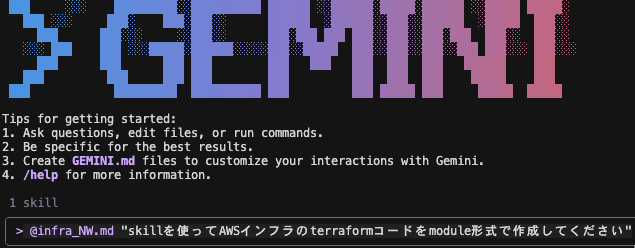
Skill の使用を許可します。
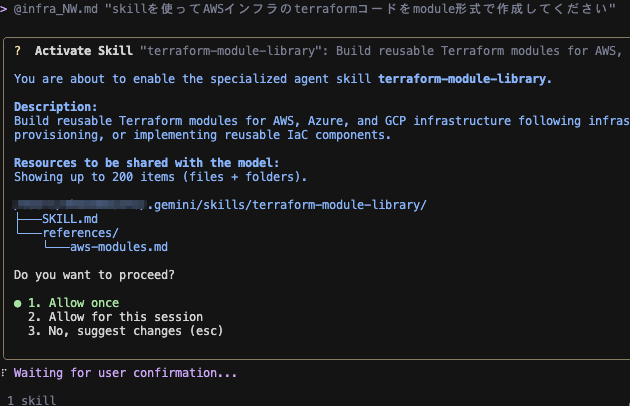
Skill を活用しコードを生成しました。
出力結果について、テストに関する言及はなかったので今回はスキップし、生成されたコードを簡単に確認、terraform plan、apply までやってみます。
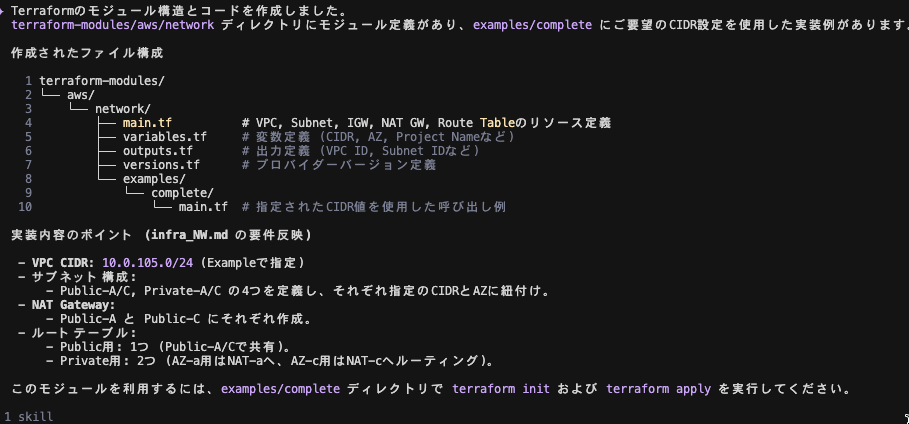
ちなみに出力結果としては、ファイル構成と実装内容のポイント、terraform コマンド実行ディレクトリについて言及されています。
✦ Terraformのモジュール構造とコードを作成しました。
  terraform-modules/aws/network ディレクトリにモジュール定義があり、examples/complete にご要望のCIDR設定を使用した実装例があります。

  作成されたファイル構成

    1 terraform-modules/
    2 └── aws/
    3     └── network/
    4         ├── main.tf          # VPC, Subnet, IGW, NAT GW, Route Tableのリソース定義
    5         ├── variables.tf     # 変数定義 (CIDR, AZ, Project Nameなど)
    6         ├── outputs.tf       # 出力定義 (VPC ID, Subnet IDなど)
    7         ├── versions.tf      # プロバイダーバージョン定義
    8         └── examples/
    9             └── complete/
   10                 └── main.tf  # 指定されたCIDR値を使用した呼び出し例

  実装内容のポイント (infra_NW.md の要件反映)

   - VPC CIDR: 10.0.105.0/24 (Exampleで指定)
   - サブネット構成:
       - Public-A/C, Private-A/C の4つを定義し、それぞれ指定のCIDRとAZに紐付け。
   - NAT Gateway:
       - Public-A と Public-C にそれぞれ作成。
   - ルートテーブル:
       - Public用: 1つ (Public-A/Cで共有)。
       - Private用: 2つ (AZ-a用はNAT-aへ、AZ-c用はNAT-cへルーティング)。

  このモジュールを利用するには、examples/complete ディレクトリで terraform init および terraform apply を実行してください。
生成されたコードは以下です。
terraform-modules/aws/network/main.tf のコードですが、aws_eip 内で vpc = true と記載されています。
aws_eip での vpc attribute は 廃止 されているので、domain = "vpc" に修正が必要です。
terraform-modules/aws/network/examples/complete/main.tf のコードですが、module の source = "../../.." は source = "../.." に修正が必要です。
terraform-modules/aws/network/main.tf
resource "aws_vpc" "main" {
  cidr_block           = var.vpc_cidr
  enable_dns_hostnames = true
  enable_dns_support   = true

  tags = merge(
    {
      Name = "${var.project_name}-vpc"
    },
    var.tags
  )
}

# -----------------------------------------------------------------------------
# Subnets
# -----------------------------------------------------------------------------

resource "aws_subnet" "public_a" {
  vpc_id            = aws_vpc.main.id
  cidr_block        = var.public_subnet_a_cidr
  availability_zone = var.az_a

  tags = merge(
    {
      Name = "${var.project_name}-public-subnet-a"
      Type = "Public"
    },
    var.tags
  )
}

resource "aws_subnet" "public_c" {
  vpc_id            = aws_vpc.main.id
  cidr_block        = var.public_subnet_c_cidr
  availability_zone = var.az_c

  tags = merge(
    {
      Name = "${var.project_name}-public-subnet-c"
      Type = "Public"
    },
    var.tags
  )
}

resource "aws_subnet" "private_a" {
  vpc_id            = aws_vpc.main.id
  cidr_block        = var.private_subnet_a_cidr
  availability_zone = var.az_a

  tags = merge(
    {
      Name = "${var.project_name}-private-subnet-a"
      Type = "Private"
    },
    var.tags
  )
}

resource "aws_subnet" "private_c" {
  vpc_id            = aws_vpc.main.id
  cidr_block        = var.private_subnet_c_cidr
  availability_zone = var.az_c

  tags = merge(
    {
      Name = "${var.project_name}-private-subnet-c"
      Type = "Private"
    },
    var.tags
  )
}

# -----------------------------------------------------------------------------
# Internet Gateway
# -----------------------------------------------------------------------------

resource "aws_internet_gateway" "main" {
  vpc_id = aws_vpc.main.id

  tags = merge(
    {
      Name = "${var.project_name}-igw"
    },
    var.tags
  )
}

# -----------------------------------------------------------------------------
# NAT Gateways
# -----------------------------------------------------------------------------

resource "aws_eip" "nat_a" {
  vpc = true

  tags = merge(
    {
      Name = "${var.project_name}-eip-nat-a"
    },
    var.tags
  )
}

resource "aws_eip" "nat_c" {
  vpc = true

  tags = merge(
    {
      Name = "${var.project_name}-eip-nat-c"
    },
    var.tags
  )
}

resource "aws_nat_gateway" "nat_a" {
  allocation_id = aws_eip.nat_a.id
  subnet_id     = aws_subnet.public_a.id

  tags = merge(
    {
      Name = "${var.project_name}-nat-a"
    },
    var.tags
  )

  depends_on = [aws_internet_gateway.main]
}

resource "aws_nat_gateway" "nat_c" {
  allocation_id = aws_eip.nat_c.id
  subnet_id     = aws_subnet.public_c.id

  tags = merge(
    {
      Name = "${var.project_name}-nat-c"
    },
    var.tags
  )

  depends_on = [aws_internet_gateway.main]
}

# -----------------------------------------------------------------------------
# Route Tables
# -----------------------------------------------------------------------------

# Public Route Table (Shared)
resource "aws_route_table" "public" {
  vpc_id = aws_vpc.main.id

  route {
    cidr_block = "0.0.0.0/0"
    gateway_id = aws_internet_gateway.main.id
  }

  tags = merge(
    {
      Name = "${var.project_name}-public-rtb"
    },
    var.tags
  )
}

# Private Route Table A (Uses NAT GW in AZ-a)
resource "aws_route_table" "private_a" {
  vpc_id = aws_vpc.main.id

  route {
    cidr_block     = "0.0.0.0/0"
    nat_gateway_id = aws_nat_gateway.nat_a.id
  }

  tags = merge(
    {
      Name = "${var.project_name}-private-rtb-a"
    },
    var.tags
  )
}

# Private Route Table C (Uses NAT GW in AZ-c)
resource "aws_route_table" "private_c" {
  vpc_id = aws_vpc.main.id

  route {
    cidr_block     = "0.0.0.0/0"
    nat_gateway_id = aws_nat_gateway.nat_c.id
  }

  tags = merge(
    {
      Name = "${var.project_name}-private-rtb-c"
    },
    var.tags
  )
}

# -----------------------------------------------------------------------------
# Route Table Associations
# -----------------------------------------------------------------------------

resource "aws_route_table_association" "public_a" {
  subnet_id      = aws_subnet.public_a.id
  route_table_id = aws_route_table.public.id
}

resource "aws_route_table_association" "public_c" {
  subnet_id      = aws_subnet.public_c.id
  route_table_id = aws_route_table.public.id
}

resource "aws_route_table_association" "private_a" {
  subnet_id      = aws_subnet.private_a.id
  route_table_id = aws_route_table.private_a.id
}

resource "aws_route_table_association" "private_c" {
  subnet_id      = aws_subnet.private_c.id
  route_table_id = aws_route_table.private_c.id
}
terraform-modules/aws/network/outputs.tf
output "vpc_id" {
  description = "The ID of the VPC"
  value       = aws_vpc.main.id
}

output "vpc_cidr_block" {
  description = "The CIDR block of the VPC"
  value       = aws_vpc.main.cidr_block
}

output "public_subnet_a_id" {
  description = "ID of Public Subnet A"
  value       = aws_subnet.public_a.id
}

output "public_subnet_c_id" {
  description = "ID of Public Subnet C"
  value       = aws_subnet.public_c.id
}

output "private_subnet_a_id" {
  description = "ID of Private Subnet A"
  value       = aws_subnet.private_a.id
}

output "private_subnet_c_id" {
  description = "ID of Private Subnet C"
  value       = aws_subnet.private_c.id
}

output "nat_gateway_a_id" {
  description = "ID of NAT Gateway in AZ A"
  value       = aws_nat_gateway.nat_a.id
}

output "nat_gateway_c_id" {
  description = "ID of NAT Gateway in AZ C"
  value       = aws_nat_gateway.nat_c.id
}
terraform-modules/aws/network/variables.tf
variable "vpc_cidr" {
  description = "The CIDR block for the VPC"
  type        = string
}

variable "project_name" {
  description = "Project name to be used for tagging resources"
  type        = string
  default     = "main"
}

variable "public_subnet_a_cidr" {
  description = "CIDR block for Public Subnet A"
  type        = string
}

variable "public_subnet_c_cidr" {
  description = "CIDR block for Public Subnet C"
  type        = string
}

variable "private_subnet_a_cidr" {
  description = "CIDR block for Private Subnet A"
  type        = string
}

variable "private_subnet_c_cidr" {
  description = "CIDR block for Private Subnet C"
  type        = string
}

variable "az_a" {
  description = "Availability Zone A"
  type        = string
  default     = "ap-northeast-1a"
}

variable "az_c" {
  description = "Availability Zone C"
  type        = string
  default     = "ap-northeast-1c"
}

variable "tags" {
  description = "Additional tags for all resources"
  type        = map(string)
  default     = {}
}
terraform-modules/aws/network/version.tf
terraform {
  required_version = ">= 1.0.0"

  required_providers {
    aws = {
      source  = "hashicorp/aws"
      version = ">= 4.0.0"
    }
  }
}
terraform-modules/aws/network/examples/complete/main.tf
terraform {
  required_version = ">= 1.0.0"
  required_providers {
    aws = {
      source  = "hashicorp/aws"
      version = ">= 4.0.0"
    }
  }
}

provider "aws" {
  region = "ap-northeast-1"
}

module "network" {
  source = "../../.."

  project_name = "example-project"
  vpc_cidr     = "10.0.105.0/24"

  public_subnet_a_cidr = "10.0.105.0/27"
  public_subnet_c_cidr = "10.0.105.32/27"

  private_subnet_a_cidr = "10.0.105.64/27"
  private_subnet_c_cidr = "10.0.105.96/27"

  az_a = "ap-northeast-1a"
  az_c = "ap-northeast-1c"

  tags = {
    Environment = "dev"
    Owner       = "terraform"
  }
}

output "vpc_id" {
  value = module.network.vpc_id
}
生成されたコードから2箇所修正し、terraform plan を実行します。
terraform plan の実行結果
$ terraform plan
Terraform used the selected providers to generate the following execution plan. Resource actions are indicated with the
following symbols:
+ create
Terraform will perform the following actions:
# module.network.aws_eip.nat_a will be created
+ resource "aws_eip" "nat_a" {
+ allocation_id = (known after apply)
+ arn = (known after apply)
+ association_id = (known after apply)
+ carrier_ip = (known after apply)
+ customer_owned_ip = (known after apply)
+ domain = "vpc"
+ id = (known after apply)
+ instance = (known after apply)
+ ipam_pool_id = (known after apply)
+ network_border_group = (known after apply)
+ network_interface = (known after apply)
+ private_dns = (known after apply)
+ private_ip = (known after apply)
+ ptr_record = (known after apply)
+ public_dns = (known after apply)
+ public_ip = (known after apply)
+ public_ipv4_pool = (known after apply)
+ region = "ap-northeast-1"
+ tags = {
+ "Environment" = "dev"
+ "Name" = "example-project-eip-nat-a"
+ "Owner" = "terraform"
}
+ tags_all = {
+ "Environment" = "dev"
+ "Name" = "example-project-eip-nat-a"
+ "Owner" = "terraform"
}
}
# module.network.aws_eip.nat_c will be created
+ resource "aws_eip" "nat_c" {
+ allocation_id = (known after apply)
+ arn = (known after apply)
+ association_id = (known after apply)
+ carrier_ip = (known after apply)
+ customer_owned_ip = (known after apply)
+ domain = "vpc"
+ id = (known after apply)
+ instance = (known after apply)
+ ipam_pool_id = (known after apply)
+ network_border_group = (known after apply)
+ network_interface = (known after apply)
+ private_dns = (known after apply)
+ private_ip = (known after apply)
+ ptr_record = (known after apply)
+ public_dns = (known after apply)
+ public_ip = (known after apply)
+ public_ipv4_pool = (known after apply)
+ region = "ap-northeast-1"
+ tags = {
+ "Environment" = "dev"
+ "Name" = "example-project-eip-nat-c"
+ "Owner" = "terraform"
}
+ tags_all = {
+ "Environment" = "dev"
+ "Name" = "example-project-eip-nat-c"
+ "Owner" = "terraform"
}
}
# module.network.aws_internet_gateway.main will be created
+ resource "aws_internet_gateway" "main" {
+ arn = (known after apply)
+ id = (known after apply)
+ owner_id = (known after apply)
+ region = "ap-northeast-1"
+ tags = {
+ "Environment" = "dev"
+ "Name" = "example-project-igw"
+ "Owner" = "terraform"
}
+ tags_all = {
+ "Environment" = "dev"
+ "Name" = "example-project-igw"
+ "Owner" = "terraform"
}
+ vpc_id = (known after apply)
}
# module.network.aws_nat_gateway.nat_a will be created
+ resource "aws_nat_gateway" "nat_a" {
+ allocation_id = (known after apply)
+ association_id = (known after apply)
+ auto_provision_zones = (known after apply)
+ auto_scaling_ips = (known after apply)
+ availability_mode = (known after apply)
+ connectivity_type = "public"
+ id = (known after apply)
+ network_interface_id = (known after apply)
+ private_ip = (known after apply)
+ public_ip = (known after apply)
+ region = "ap-northeast-1"
+ regional_nat_gateway_address = (known after apply)
+ regional_nat_gateway_auto_mode = (known after apply)
+ route_table_id = (known after apply)
+ secondary_allocation_ids = (known after apply)
+ secondary_private_ip_address_count = (known after apply)
+ secondary_private_ip_addresses = (known after apply)
+ subnet_id = (known after apply)
+ tags = {
+ "Environment" = "dev"
+ "Name" = "example-project-nat-a"
+ "Owner" = "terraform"
}
+ tags_all = {
+ "Environment" = "dev"
+ "Name" = "example-project-nat-a"
+ "Owner" = "terraform"
}
+ vpc_id = (known after apply)
}
# module.network.aws_nat_gateway.nat_c will be created
+ resource "aws_nat_gateway" "nat_c" {
+ allocation_id = (known after apply)
+ association_id = (known after apply)
+ auto_provision_zones = (known after apply)
+ auto_scaling_ips = (known after apply)
+ availability_mode = (known after apply)
+ connectivity_type = "public"
+ id = (known after apply)
+ network_interface_id = (known after apply)
+ private_ip = (known after apply)
+ public_ip = (known after apply)
+ region = "ap-northeast-1"
+ regional_nat_gateway_address = (known after apply)
+ regional_nat_gateway_auto_mode = (known after apply)
+ route_table_id = (known after apply)
+ secondary_allocation_ids = (known after apply)
+ secondary_private_ip_address_count = (known after apply)
+ secondary_private_ip_addresses = (known after apply)
+ subnet_id = (known after apply)
+ tags = {
+ "Environment" = "dev"
+ "Name" = "example-project-nat-c"
+ "Owner" = "terraform"
}
+ tags_all = {
+ "Environment" = "dev"
+ "Name" = "example-project-nat-c"
+ "Owner" = "terraform"
}
+ vpc_id = (known after apply)
}
# module.network.aws_route_table.private_a will be created
+ resource "aws_route_table" "private_a" {
+ arn = (known after apply)
+ id = (known after apply)
+ owner_id = (known after apply)
+ propagating_vgws = (known after apply)
+ region = "ap-northeast-1"
+ route = [
+ {
+ cidr_block = "0.0.0.0/0"
+ nat_gateway_id = (known after apply)
# (11 unchanged attributes hidden)
},
]
+ tags = {
+ "Environment" = "dev"
+ "Name" = "example-project-private-rtb-a"
+ "Owner" = "terraform"
}
+ tags_all = {
+ "Environment" = "dev"
+ "Name" = "example-project-private-rtb-a"
+ "Owner" = "terraform"
}
+ vpc_id = (known after apply)
}
# module.network.aws_route_table.private_c will be created
+ resource "aws_route_table" "private_c" {
+ arn = (known after apply)
+ id = (known after apply)
+ owner_id = (known after apply)
+ propagating_vgws = (known after apply)
+ region = "ap-northeast-1"
+ route = [
+ {
+ cidr_block = "0.0.0.0/0"
+ nat_gateway_id = (known after apply)
# (11 unchanged attributes hidden)
},
]
+ tags = {
+ "Environment" = "dev"
+ "Name" = "example-project-private-rtb-c"
+ "Owner" = "terraform"
}
+ tags_all = {
+ "Environment" = "dev"
+ "Name" = "example-project-private-rtb-c"
+ "Owner" = "terraform"
}
+ vpc_id = (known after apply)
}
# module.network.aws_route_table.public will be created
+ resource "aws_route_table" "public" {
+ arn = (known after apply)
+ id = (known after apply)
+ owner_id = (known after apply)
+ propagating_vgws = (known after apply)
+ region = "ap-northeast-1"
+ route = [
+ {
+ cidr_block = "0.0.0.0/0"
+ gateway_id = (known after apply)
# (11 unchanged attributes hidden)
},
]
+ tags = {
+ "Environment" = "dev"
+ "Name" = "example-project-public-rtb"
+ "Owner" = "terraform"
}
+ tags_all = {
+ "Environment" = "dev"
+ "Name" = "example-project-public-rtb"
+ "Owner" = "terraform"
}
+ vpc_id = (known after apply)
}
# module.network.aws_route_table_association.private_a will be created
+ resource "aws_route_table_association" "private_a" {
+ id = (known after apply)
+ region = "ap-northeast-1"
+ route_table_id = (known after apply)
+ subnet_id = (known after apply)
}
# module.network.aws_route_table_association.private_c will be created
+ resource "aws_route_table_association" "private_c" {
+ id = (known after apply)
+ region = "ap-northeast-1"
+ route_table_id = (known after apply)
+ subnet_id = (known after apply)
}
# module.network.aws_route_table_association.public_a will be created
+ resource "aws_route_table_association" "public_a" {
+ id = (known after apply)
+ region = "ap-northeast-1"
+ route_table_id = (known after apply)
+ subnet_id = (known after apply)
}
# module.network.aws_route_table_association.public_c will be created
+ resource "aws_route_table_association" "public_c" {
+ id = (known after apply)
+ region = "ap-northeast-1"
+ route_table_id = (known after apply)
+ subnet_id = (known after apply)
}
# module.network.aws_subnet.private_a will be created
+ resource "aws_subnet" "private_a" {
+ arn = (known after apply)
+ assign_ipv6_address_on_creation = false
+ availability_zone = "ap-northeast-1a"
+ availability_zone_id = (known after apply)
+ cidr_block = "10.0.105.64/27"
+ enable_dns64 = false
+ enable_resource_name_dns_a_record_on_launch = false
+ enable_resource_name_dns_aaaa_record_on_launch = false
+ id = (known after apply)
+ ipv6_cidr_block_association_id = (known after apply)
+ ipv6_native = false
+ map_public_ip_on_launch = false
+ owner_id = (known after apply)
+ private_dns_hostname_type_on_launch = (known after apply)
+ region = "ap-northeast-1"
+ tags = {
+ "Environment" = "dev"
+ "Name" = "example-project-private-subnet-a"
+ "Owner" = "terraform"
+ "Type" = "Private"
}
+ tags_all = {
+ "Environment" = "dev"
+ "Name" = "example-project-private-subnet-a"
+ "Owner" = "terraform"
+ "Type" = "Private"
}
+ vpc_id = (known after apply)
}
# module.network.aws_subnet.private_c will be created
+ resource "aws_subnet" "private_c" {
+ arn = (known after apply)
+ assign_ipv6_address_on_creation = false
+ availability_zone = "ap-northeast-1c"
+ availability_zone_id = (known after apply)
+ cidr_block = "10.0.105.96/27"
+ enable_dns64 = false
+ enable_resource_name_dns_a_record_on_launch = false
+ enable_resource_name_dns_aaaa_record_on_launch = false
+ id = (known after apply)
+ ipv6_cidr_block_association_id = (known after apply)
+ ipv6_native = false
+ map_public_ip_on_launch = false
+ owner_id = (known after apply)
+ private_dns_hostname_type_on_launch = (known after apply)
+ region = "ap-northeast-1"
+ tags = {
+ "Environment" = "dev"
+ "Name" = "example-project-private-subnet-c"
+ "Owner" = "terraform"
+ "Type" = "Private"
}
+ tags_all = {
+ "Environment" = "dev"
+ "Name" = "example-project-private-subnet-c"
+ "Owner" = "terraform"
+ "Type" = "Private"
}
+ vpc_id = (known after apply)
}
# module.network.aws_subnet.public_a will be created
+ resource "aws_subnet" "public_a" {
+ arn = (known after apply)
+ assign_ipv6_address_on_creation = false
+ availability_zone = "ap-northeast-1a"
+ availability_zone_id = (known after apply)
+ cidr_block = "10.0.105.0/27"
+ enable_dns64 = false
+ enable_resource_name_dns_a_record_on_launch = false
+ enable_resource_name_dns_aaaa_record_on_launch = false
+ id = (known after apply)
+ ipv6_cidr_block_association_id = (known after apply)
+ ipv6_native = false
+ map_public_ip_on_launch = false
+ owner_id = (known after apply)
+ private_dns_hostname_type_on_launch = (known after apply)
+ region = "ap-northeast-1"
+ tags = {
+ "Environment" = "dev"
+ "Name" = "example-project-public-subnet-a"
+ "Owner" = "terraform"
+ "Type" = "Public"
}
+ tags_all = {
+ "Environment" = "dev"
+ "Name" = "example-project-public-subnet-a"
+ "Owner" = "terraform"
+ "Type" = "Public"
}
+ vpc_id = (known after apply)
}
# module.network.aws_subnet.public_c will be created
+ resource "aws_subnet" "public_c" {
+ arn = (known after apply)
+ assign_ipv6_address_on_creation = false
+ availability_zone = "ap-northeast-1c"
+ availability_zone_id = (known after apply)
+ cidr_block = "10.0.105.32/27"
+ enable_dns64 = false
+ enable_resource_name_dns_a_record_on_launch = false
+ enable_resource_name_dns_aaaa_record_on_launch = false
+ id = (known after apply)
+ ipv6_cidr_block_association_id = (known after apply)
+ ipv6_native = false
+ map_public_ip_on_launch = false
+ owner_id = (known after apply)
+ private_dns_hostname_type_on_launch = (known after apply)
+ region = "ap-northeast-1"
+ tags = {
+ "Environment" = "dev"
+ "Name" = "example-project-public-subnet-c"
+ "Owner" = "terraform"
+ "Type" = "Public"
}
+ tags_all = {
+ "Environment" = "dev"
+ "Name" = "example-project-public-subnet-c"
+ "Owner" = "terraform"
+ "Type" = "Public"
}
+ vpc_id = (known after apply)
}
# module.network.aws_vpc.main will be created
+ resource "aws_vpc" "main" {
+ arn = (known after apply)
+ cidr_block = "10.0.105.0/24"
+ default_network_acl_id = (known after apply)
+ default_route_table_id = (known after apply)
+ default_security_group_id = (known after apply)
+ dhcp_options_id = (known after apply)
+ enable_dns_hostnames = true
+ enable_dns_support = true
+ enable_network_address_usage_metrics = (known after apply)
+ id = (known after apply)
+ instance_tenancy = "default"
+ ipv6_association_id = (known after apply)
+ ipv6_cidr_block = (known after apply)
+ ipv6_cidr_block_network_border_group = (known after apply)
+ main_route_table_id = (known after apply)
+ owner_id = (known after apply)
+ region = "ap-northeast-1"
+ tags = {
+ "Environment" = "dev"
+ "Name" = "example-project-vpc"
+ "Owner" = "terraform"
}
+ tags_all = {
+ "Environment" = "dev"
+ "Name" = "example-project-vpc"
+ "Owner" = "terraform"
}
}
Plan: 17 to add, 0 to change, 0 to destroy.
Changes to Outputs:
+ vpc_id = (known after apply)
続いて terraform apply を実行します。
実行結果は以下です。
$ terraform apply
〜省略〜
Apply complete! Resources: 17 added, 0 changed, 0 destroyed.

Outputs:

vpc_id = "vpc-01602b21cd5a9f3ec"
デプロイ成功です。
infra_NW.md 通り作成されているか簡易的ですがコンソールで確認します。
VPC は CIDR 10.0.105.0/24、サブネットはPublic-Aが10.0.105.0/27、Public-Cが10.0.105.32/27、Private-Aが10.0.105.64/27、Private-Cが10.0.105.96/27で作成されています。
ネットワーク接続より、NAT Gateway は各 AZ (ap-northeast-1a と ap-northeast-1c)ごとに作成され、各 AZ 用の Private サブネットの RTB に設定されています。
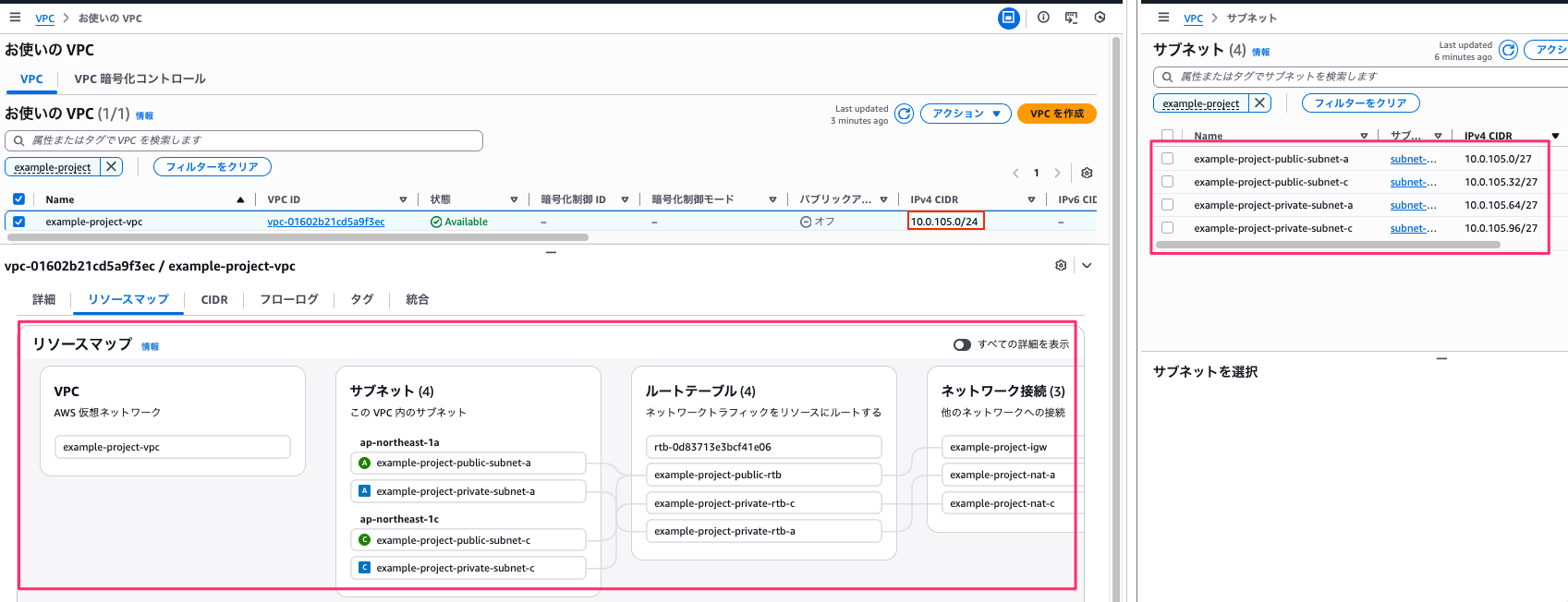
Public サブネットについては指定通り共通の RTB となっています。
Private サブネット の RTB は各 AZ 用の Private サブネットごとに作成されています。
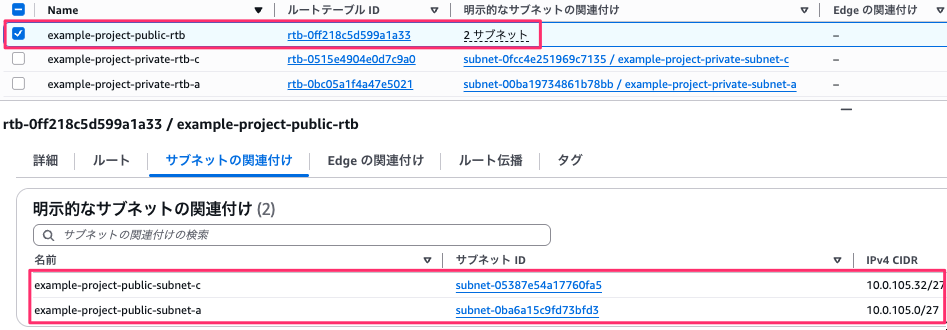
terraform-module-library を試してみた結果については、これで以上です。
一部コードに手を加えましたが、CIDR や RTB の設定については指示通りに生成されていました。
ただ、aws_eip の部分で非推奨と思われるコードを生成しており、これは今回 AWS や Terraform に関する 最新情報を取得するための MCP を設定せず、LLM 頼りのコード生成をしたためだと思われます。
より質の高いコードを生成したい場合、然るべき MCP を設定し、また、実務ベースだと、プロジェクト内容次第で命名規則やディレクトリ構成が変わるかと思いますので、この辺りの細かい指示も定義した上で、Skill を活用する必要があるかと思います。
5.おわりに
Skills.sh のサイトの内容紹介から、Skill のインストールとその Skill を使ってみた結果を記載してきました。
現在、様々な Skill が Web 上に存在しますが、それらを一つのサイト上で参照することができ、また、Skill のランキング情報から人気の Skill を知ることができるのが便利なところかと思います。
私は業務において Terraform を利用することが多いので、Terraform の Skill を使ってみましたが、皆様も業務で活用できる Skill を見つけ、試していただくのが良いかと思います。
 簡単30秒
簡単30秒