



はじめに
私は所属する部のAmazon Q Developer Proサブスクリプションを管理しています。
各ユーザーに対する発行/解約の判断は、部配下の各セクション(≒課)で行うため、その判断材料となるレポートを定期的に出力しています。
ダッシュボードで全体の傾向は掴めますが、各ユーザーの状況を細かく把握したいため、S3に出力したユーザーアクティビティレポートをAthenaで集計分析しています。
本記事では前半でアクティビティレポートの分析方法を、後半で実際に管理・推進したときの流れを共有させてもらいます。
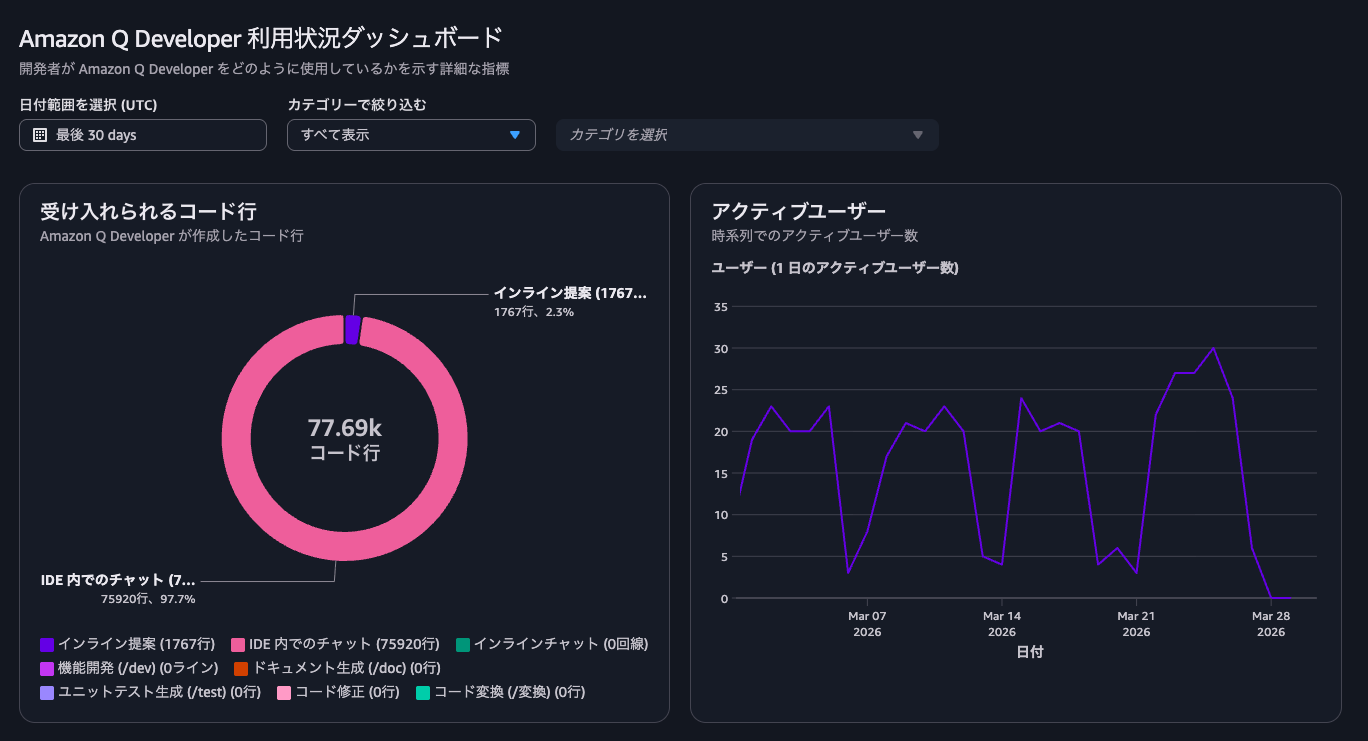
ダッシュボードは便利ですが、ユーザー個別の情報までは確認が難しいため、アクティビティレポートを利用します。
アクティビティレポート分析
ユーザーアクティビティレポート出力
ユーザー毎のアクティビティを記録するには、設定から「Q Developer user activity report」を有効にして出力先のS3ディレクトリを指定する必要があります。

アクティビティレポートを保存するバケットにはいくつか前提条件があります。
Amazon Q Developer での特定のユーザーのアクティビティの表示
に明記されているので、これに従って準備・設定してください。
ログを書き込むためのバケットポリシー設定が必要です。
出力先
Amazon Q は、毎日午前 0 時 (00:00) 協定世界時 (UTC) にレポートを生成し、次のパスの CSV ファイルに保存します。
s3://bucketName/prefix/AWSLogs/accountId/QDeveloperLogs/by_user_analytic/region/year/month/day/00/accountId_by_user_analytic_timestamp.csv
今回は出力先に s3://q-developer-activity-{accountId}/q-developer/ を指定したとして進めます。
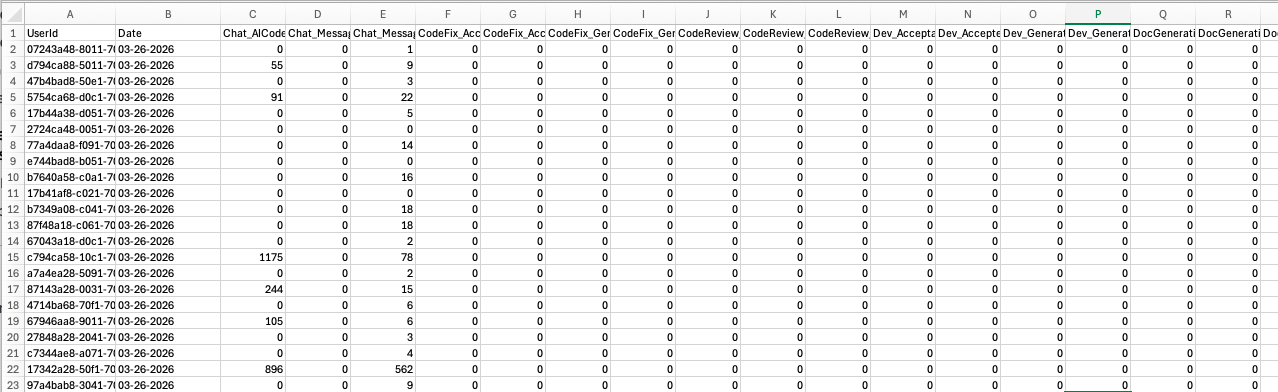
ドキュメントに記載されている通り日次のレポートがCSVで出力されます。
出力される項目とその解説は ユーザーアクティビティレポートのメトリクス に記載されています。
ユーザー毎に日次のレコード行が作られますが、ユーザーはIDで表現されているため、このままでは使いにくいです。ユーザー名が欲しいところです。
ユーザー名をどこから持ってくるか?
レポートにはユーザー情報はIDしか含まれないため、AWS Identity Centerからユーザー情報を持ってくるようにします。
今回のIdentity Centerとサブスクリプションの構成は、以下のようにしています。
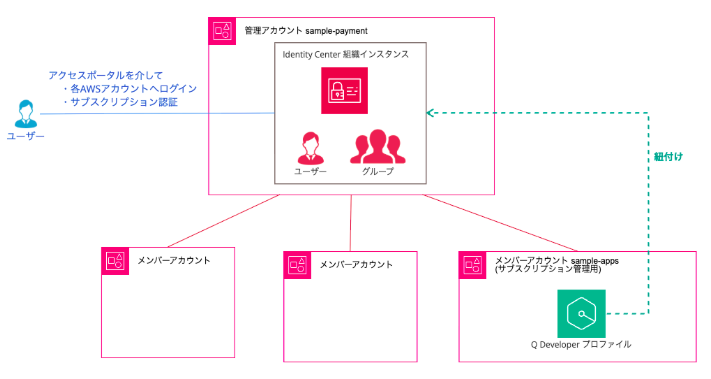
参考:組織で Amazon Q Developer を始めるための AWS IAM Identity Center 入門
この構成ではIdentity Centerの情報は組織インスタンスのある管理アカウントから取得する必要があります。
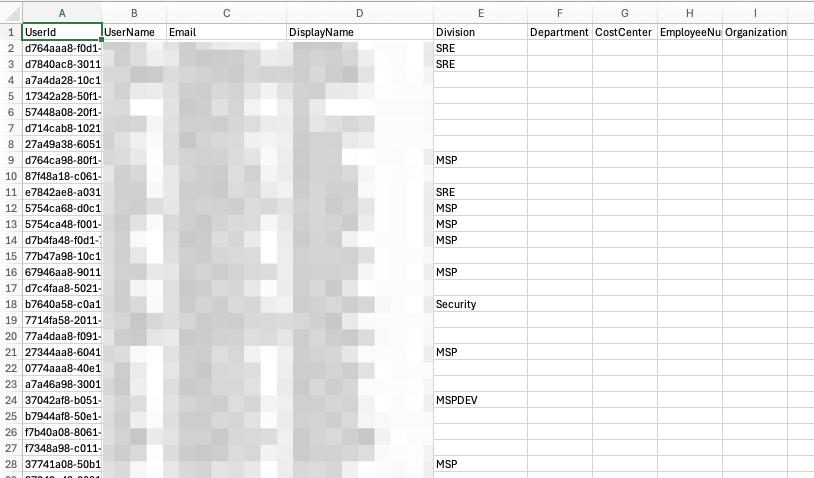
取得してCSVとして出力するスクリプトを用意しました。
get_identity_center_users.py
サブスクリプション登録をグループ単位で行なっているため、サブスクリプション対象のグループIDを指定して抽出する形式にしています。
管理アカウントのAWS CloudShellでスクリプトを実行します。
python3 get_identity_center_users.py <group_id_1> [group_id_2 ...] > users.csv
このスクリプトも Q Developerに作ってもらいました。
- ユーザーの「ジョブ関連情報」も取得したいので
describe_userをリクエストするときExtensions=["aws:identitystore:enterprise"]を指定するよう指示しています。 - デバッグを兼ねて、所属するグループIDを最後の列で出力するよう指示しました。
ここで取得した users.csv をアクティビティレコード出力先のS3バケットに格納しておきます。
今回は s3://q-developer-activity-{accountId}/identity-center/users/users.csv に保存します。
必要に応じて、定期実行や情報変更トリガーで動き、S3にアップロードまでするLambdaにしてしまうと便利です。
Athenaテーブル作成
「S3に記録されるアクティビティレコード」「S3に保存したIdentity Centerのユーザーリスト」をAthenaテーブルとして登録します。
{}内は実際の環境に合わせます。
アクティビティレコードテーブル
CREATE EXTERNAL TABLE `q_developer_by_user_analytic`(
  `userid` string,
  `date` string,
  `chat_aicodelines` string,
  `chat_messagesinteracted` string,
  `chat_messagessent` string,
  `codefix_acceptanceeventcount` string,
  `codefix_acceptedlines` string,
  `codefix_generatedlines` string,
  `codefix_generationeventcount` string,
  `codereview_failedeventcount` string,
  `codereview_findingscount` string,
  `codereview_succeededeventcount` string,
  `dev_acceptanceeventcount` string,
  `dev_acceptedlines` string,
  `dev_generatedlines` string,
  `dev_generationeventcount` string,
  `docgeneration_acceptedfileupdates` string,
  `docgeneration_acceptedfilescreations` string,
  `docgeneration_acceptedlineadditions` string,
  `docgeneration_acceptedlineupdates` string,
  `docgeneration_eventcount` string,
  `docgeneration_rejectedfilecreations` string,
  `docgeneration_rejectedfileupdates` string,
  `docgeneration_rejectedlineadditions` string,
  `docgeneration_rejectedlineupdates` string,
  `inlinechat_acceptanceeventcount` string,
  `inlinechat_acceptedlineadditions` string,
  `inlinechat_acceptedlinedeletions` string,
  `inlinechat_dismissaleventcount` string,
  `inlinechat_dismissedlineadditions` string,
  `inlinechat_dismissedlinedeletions` string,
  `inlinechat_rejectedlineadditions` string,
  `inlinechat_rejectedlinedeletions` string,
  `inlinechat_rejectioneventcount` string,
  `inlinechat_totaleventcount` string,
  `inline_aicodelines` string,
  `inline_acceptancecount` string,
  `inline_suggestionscount` string,
  `testgeneration_acceptedlines` string,
  `testgeneration_acceptedtests` string,
  `testgeneration_eventcount` string,
  `testgeneration_generatedlines` string,
  `testgeneration_generatedtests` string,
  `transformation_eventcount` string,
  `transformation_linesgenerated` string,
  `transformation_linesingested` string)
PARTITIONED BY (
  `year` string,
  `month` string,
  `day` string)
ROW FORMAT SERDE
  'org.apache.hadoop.hive.serde2.OpenCSVSerde'
WITH SERDEPROPERTIES (
  'escapeChar'='\\',
  'quoteChar'='"',
  'separatorChar'=',')
STORED AS INPUTFORMAT
  'org.apache.hadoop.mapred.TextInputFormat'
OUTPUTFORMAT
  'org.apache.hadoop.hive.ql.io.HiveIgnoreKeyTextOutputFormat'
LOCATION
  's3://q-developer-activity-{accountId}/q-developer/AWSLogs/{accountId}/QDeveloperLogs/by_user_analytic/{region}'
TBLPROPERTIES (
  'projection.day.digits'='2',
  'projection.day.range'='01,31',
  'projection.day.type'='integer',
  'projection.enabled'='true',
  'projection.month.digits'='2',
  'projection.month.range'='01,12',
  'projection.month.type'='integer',
  'projection.year.range'='2024,2040',
  'projection.year.type'='integer',
  'skip.header.line.count'='1',
  'storage.location.template'='s3://q-developer-activity-{accountId}/q-developer/AWSLogs/{accountId}/QDeveloperLogs/by_user_analytic/{region}/${year}/${month}/${day}')
- year, month, day でパーティションを切っています。
Identity Centerユーザーリスト
CREATE EXTERNAL TABLE `identity_center_users`(
  `userid` string,
  `username` string,
  `email` string,
  `displayname` string,
  `division` string,
  `department` string,
  `costcenter` string,
  `employeenumber` string,
  `organization` string,
  `groupids` string
  )
ROW FORMAT SERDE
  'org.apache.hadoop.hive.serde2.OpenCSVSerde'
WITH SERDEPROPERTIES (
  'escapeChar'='\\',
  'quoteChar'='\"',
  'separatorChar'=',')
STORED AS INPUTFORMAT
  'org.apache.hadoop.mapred.TextInputFormat'
OUTPUTFORMAT
  'org.apache.hadoop.hive.ql.io.HiveIgnoreKeyTextOutputFormat'
LOCATION
  's3://q-developer-activity-{accountId}/identity-center/users'
TBLPROPERTIES (
  'skip.header.line.count'='1')
レポート例
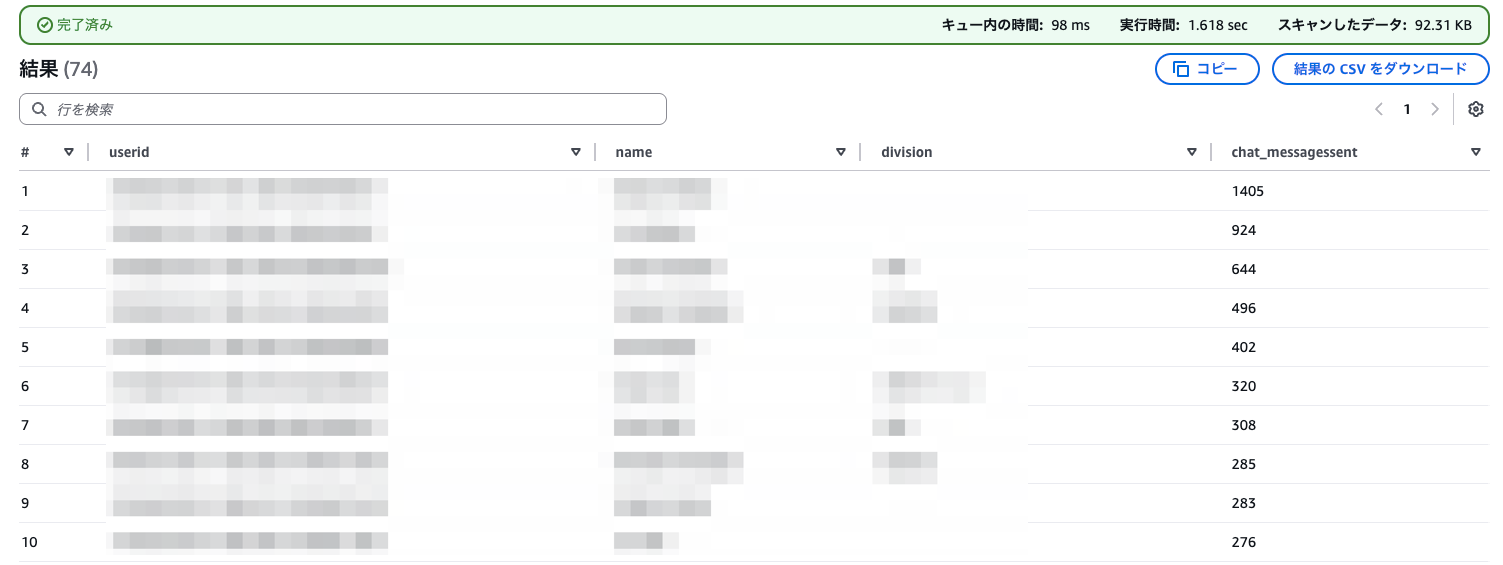
月間Chat_MessagesSent集計
SELECT
    u.userid,
    u.displayname AS name,
    u.division,
    COALESCE(SUM(a.chat_messagessent), 0) AS chat_messagessent
FROM identity_center_users u
LEFT JOIN q_developer_by_user_analytic a
  ON u.userid = a.userid AND a.year = '2026' AND a.month = '02'
GROUP BY u.userid, u.displayname, u.division
ORDER BY chat_messagessent DESC;
identity_center_usersに対してq_developer_by_user_analyticをLEFT JOINしています。
日付条件をJOINのON句に入れることで、該当月にアクティビティがないユーザーもNULL → COALESCE(…, 0) で0として集計しています。
アクティビティが全くないユーザーは、そもそもアクティビティレコードが記録されません(実際の運用で確認)。 そのようなユーザーも0で集計に現れるようにしたいためidentity_center_usersを左側にしています。
月間各種アクティビティを合計スコアにして集計
SELECT
    u.userid,
    u.displayname AS name,
    u.division,
    COALESCE(SUM(a.chat_messagessent
      + a.inline_acceptancecount
      + a.codefix_acceptanceeventcount
      + a.codereview_succeededeventcount
      + a.dev_acceptanceeventcount
      + a.docgeneration_eventcount
      + a.inlinechat_totaleventcount
      + a.testgeneration_eventcount
      + a.transformation_eventcount), 0) AS activity_score
FROM identity_center_users u
LEFT JOIN q_developer_by_user_analytic a
  ON u.userid = a.userid AND a.year = '2026' AND a.month = '02'
GROUP BY u.userid, u.displayname, u.division
ORDER BY activity_score DESC;
- ひとまず簡易的にcount系のメトリクスを単純に合計したものをスコアとしています。
- テーブル定義では全カラムをstring型としており暗黙キャストを利用しています。必要に応じてCASTや型定義のチューニングを行ってください。
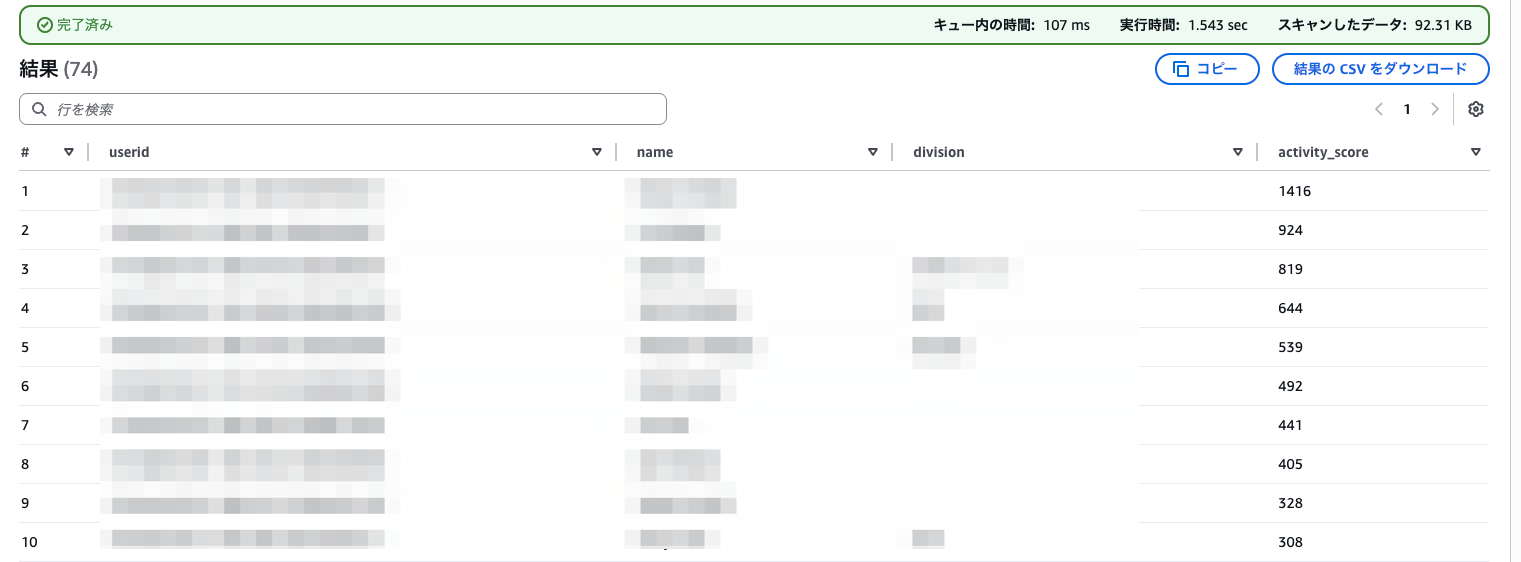
ここが長期間0や極端に低いユーザーはProサブスクリプション不要な可能性があるため、見直してもらうことがあります。
Q Developerの管理と推進
部単位でQ DeveloperのProサブスクリプションを管理し始めて半年以上になります。4月から体制が変わり管理方法も変えるので、これまでの管理やフローを本記事では振り返りを兼ねてまとめます。
推進
Proサブスクリプションの導入時、初期発行数を決めて稟議を通し、各部署から先行利用者を選出してもらいました。
しばらく皆で使ってみて、Free Tierとの比較、AWS GameDayやハンズオン、共有会などを並行して開催しながら、あったほうがよいと判断したところから徐々に利用者を増やしていく形にしました。
関連: AI & Automation 活用したAWSベスプラ提案ワークショップ開催してみた
先行利用者が中心となって使い所やオススメ設定の共有、各課での推進を行なってくれたため、今では課やメンバーによっては必須のサブスクリプションとなり$19/ユーザー/月の利用料に対して大きな効果を出してくれています。
管理
- 社内の申請システムからサブスクリプション発行を申請
- 所属上長が可否を判断し、承認の場合はサブスクリプション管理メンバーに回付
- 承認された申請内容に沿ってサブスクリプションを登録/解約
月次レポートを見て、本人や所属上長が判断して必要に応じて解約も同じフローで申請します。
他のAIアシスタントも利用しており日々変化もあるため、キャッチアップと共に適切に見直しを行うのにアクティビティレポートの利用が活きてきます。
レポートの分析結果はサブスクリプションの継続判断だけでなく、社内勉強会やハンズオンの開催、ヒアリングの参考にもしています。利用量の多いメンバーや、多くの機能を使っているメンバーに使い勝手を教えてもらったり、社内での共有をお願いすることもあります。
Transform機能の従量課金
Transform(Amazon Q Developer Agent for code transformation)はPro契約ユーザー数 × 4,000 LOCのプール上限を超えた場合、従量課金が発生します。この状況把握にもアクティビティレコードは役立っています。
Pro 利用枠の Q Developer 変革のお客様には、変革用の Amazon Q Developer エージェントについて、ユーザー 1 人あたり毎月 4,000 LOC が提供されます。これらの割り当ては、AWS 支払者アカウントレベルで毎月集計されます。Q Developer Pro 利用枠の割り当てを超える使用量については、変換用に送信された LOC あたり 0.003 USD が課金されます。
Transform機能を使う場合は、社内申請フォームに、その予定規模も記入してもらうフォーマットにして、事前に予測しやすいようにしています。
まとめ
本記事では Q Developer のアクティビティレポートをAthenaで分析し、Identity Centerのユーザー情報と組み合わせてユーザー別の利用状況を可視化する方法を紹介しました。
また、組織でProサブスクリプションを管理・推進してきた実際の運用についても共有しました。
運用を通じて感じたポイントをいくつか挙げます。
- アクティビティレポートがあることで、サブスクリプションの発行・解約を「なんとなく」ではなく根拠を持って判断できる
- 利用量の多いメンバーを巻き込んで共有・発信してもらうことで、推進が加速する
- 他のAIアシスタントも含め状況は日々変わるため、定期的な見直しサイクルを回すことが重要
導入(Identity Centerセットアップ)→ 推進(ハンズオン・共有会)→ 運用分析(本記事)という流れの中で、今回は運用分析にフォーカスしました。なにかひとつでも参考になれば幸いです。
管理や統制を行うための機能もアップデートが随時行われているため、今後もキャッチアップやAWSへのフィードバックをしていきたいと思います。
 簡単30秒
簡単30秒