



AWS Identity and Access Management (IAM) のポリシーをMCPやCLIから作成できる IAM Policy Autopilot が公開されました。
iam-policy-autopilot とは
am-policy-autopilot は、アプリケーションのソースコードを解析し、必要な AWS Identity and Access Management (以下、IAM) ポリシーを自動生成するオープンソースツールです。
これまで、開発者がアプリケーションを実装する際、使用しているAWSサービスの操作を確認し、それに対応するポリシーをドキュメントから探し出して記述する必要がありました。その結果、開発フェーズでは”とりあえずのAdmin権限”が付与され、そのまま使用され続けるリスクがありました。
今回登場した iam-policy-autopilot は、MCPサーバーとしてIDE等から、またはCLIから利用することで、コードの実装に基づいた最小権限のポリシー案を提示してくれます。
やってみた
MCP サーバーとして利用する場合、Claude Desktop アプリケーションなどの MCP クライアントと連携させることで、IDE やチャットインターフェースからiam-policy-autopilotを呼び出すことができます。
IDE(VSCode) で使ってみる
VSCodeのQ Chatで今回は試してみます。
MCPの追加ではuvを使用するため、まだインストールできていない場合はインストールが必要です。
・macOSとLinux
curl -LsSf https://astral.sh/uv/install.sh | less
・Windows
powershell -c "irm https://astral.sh/uv/install.ps1 | more“
MCPの設定は以下です。

対象となる Lambda関数を作成しました。TypeScript で Amazon DynamoDB からアイテムを取得するだけの関数です。
import { DynamoDBClient, GetItemCommand } from '@aws-sdk/client-dynamodb';

const dynamodb = new DynamoDBClient({});
const TABLE_NAME = process.env.TABLE_NAME!;

export const handler = async (event: any) => {
  try {
    const { id } = event.pathParameters || {};

    const result = await dynamodb.send(new GetItemCommand({
      TableName: TABLE_NAME,
      Key: {
        id: { S: id }
      }
    }));

    return result.Item ? {
      id: result.Item.id.S,
      data: JSON.parse(result.Item.data.S || '{}'),
      timestamp: result.Item.timestamp.N
    } : null;
  } catch (error) {
    throw error;
  }
};
特に複雑なプロンプトではなく、Lambdaのコードを開いて「Lambdaに適切なポリシーを考えて」と雑に投げてみました。
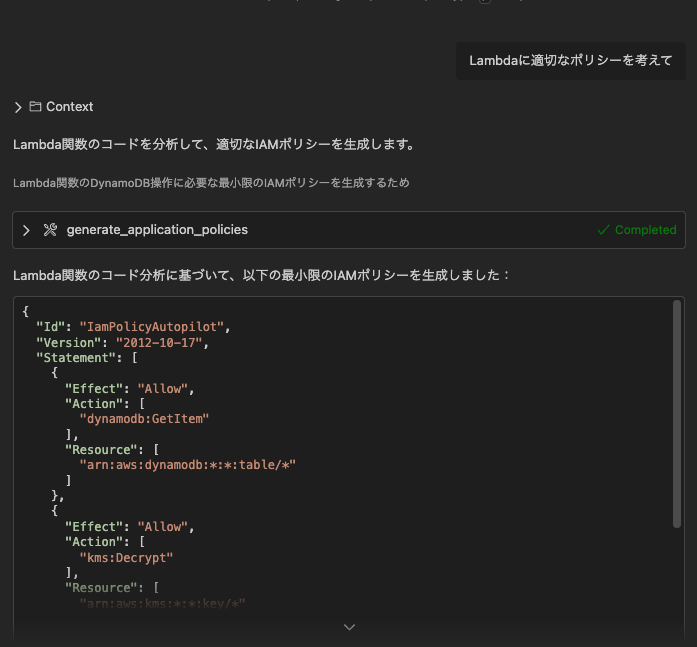
暗号化に関わらず、すべてのDynamoDBテーブルからアイテムを取得できるようなポリシーになっています。
{
  "Id": "IamPolicyAutopilot",
  "Version": "2012-10-17",
  "Statement": [
    {
      "Effect": "Allow",
      "Action": [
        "dynamodb:GetItem"
      ],
      "Resource": [
        "arn:aws:dynamodb:*:*:table/*"
      ]
    },
    {
      "Effect": "Allow",
      "Action": [
        "kms:Decrypt"
      ],
      "Resource": [
        "arn:aws:kms:*:*:key/*"
      ],
      "Condition": {
        "StringLike": {
          "kms:ViaService": [
            "dynamodb.*.amazonaws.com"
          ]
        }
      }
    }
  ]
}
ワイルドカードになっていますが、もしCDKでAWS DynamoDBを作成し、そのテーブル対してCDKで作成するLambda関数からアイテムを取得したいユースケースでは、IAM Policy Autopilot でのリソースの特定ができていなそうです。
GitHubのREADMEにも、bucketNameが実行時に決定される場合はIAM Policy Autopilotはどのバケットがアクセスされるか予測できないと書かれています。
Understand the IAM Policy Autopilot scope
IAM Policy Autopilot produces IAM identity-based policies, but doesn’t support resource-based policies such as S3 bucket policies or KMS key policies, Resource Control Policies (RCPs), Service Control Policies (SCPs), and permission boundaries. These are the limitations that you need to keep in mind. For example, if your code calls s3.getObject(bucketName) where bucketName is determined at runtime, IAM Policy Autopilot currently doesn’t predict which bucket will be accessed.
https://github.com/awslabs/iam-policy-autopilot
ポリシーを AWS のベストプラクティスに沿って作成してくれる便利な MCP ですが、やはり最終的には人間がレビューしたり調整したりする必要がありそうです。
まとめ
開発者にとって負担の大きかった IAM ポリシー作成作業が MCP のサポートにより軽減されそうな感触でした。MCP を使いつつ、システムプロンプトなどと組み合わせてより精度の高い回答を求めるとさらに便利に利用できそうです。
 簡単30秒
簡単30秒